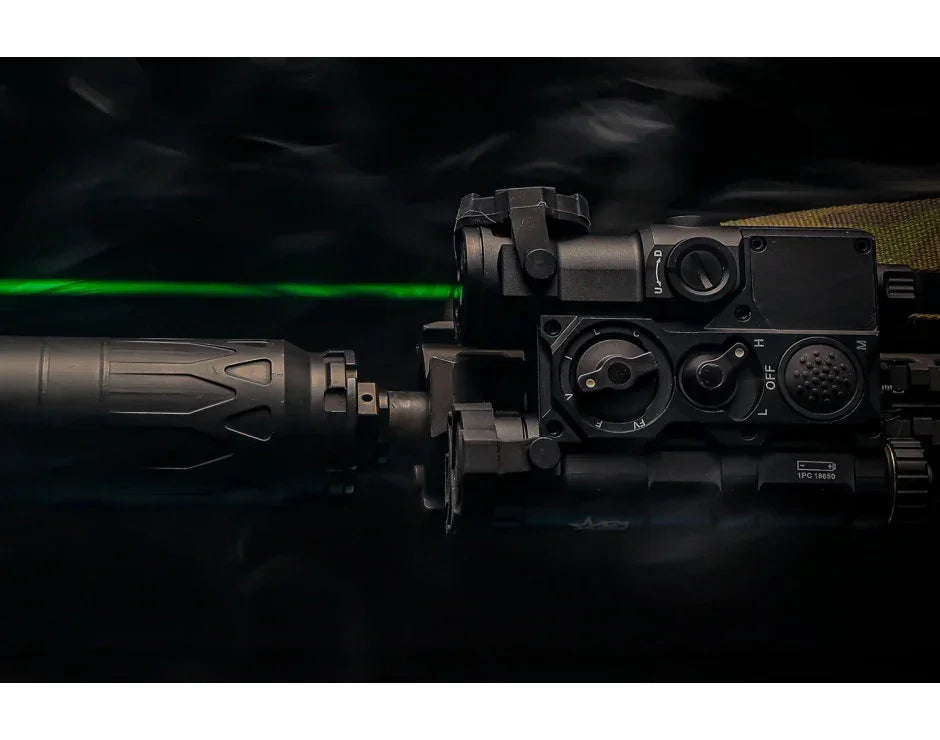
AGM WLAD Weapon Laser Aiming Device, Multi-Spectral System Class 1
The WLAD Weapon Laser Aiming Device is a CLASS 1 laser consisting of a green visible aiming laser, a near-infrared (near-IR) aiming laser, IR illuminator and 500 lm LED illuminator. The function of the WLAD is to provide an operator with highly collimated aiming lasers for precision aiming and targeting visible in low light conditions and in conjunction with night vision devices for night time applications. The focusable near-IR Illuminator floods the area of interest with near-infrared light only visible when used with night vision devices.
AGM WLAD Weapon Laser Aiming Device Features:
Rapid active target acquisition
True night vision compatible mode
Six function modes
User selectable constant wave or pulsed modes of aiming lasers
500 Lumen LED flashlight
Tactical remote switch
Co-boresighted aiming lasers
Mounting: Weaver or Rail Picatinny Type MIL-STF-1913
Low base design
IPX8 waterproof
Choice of color Black or Tan
2-Year Warranty
AGM WLAD Weapon Laser Aiming Device Specifications:
Divergence
IR LASER - 0.5+0.3 mrad, GREEN LASER - 0.5+0.3 mrad, IR ILLUMINATOR - 1-100 mrad
Class
IR LASER, GREEN LASER, IR ILLUMINATOR - Class 1
Output power
IR LASER - <0.2 mW, GREEN LASER - <1 mW, IR ILLUMINATOR - <1mW
Operating distance
IR LASER - > 400 m, GREEN LASER - > 25 m (in direct sunlight), IR ILLUMINATOR - > 100 m
Wavelength
IR LASER - 830±15 nm, GREEN LASER - 520±10 nm, GREEN LASER - 830±15 nm
Weight
298 g ( 10.5 oz)
Dimensions
113 × 77 × 42 mm (4.3 × 3.0 × 1.5 in)
Color (housing)
Black (WLAD-1B) / Tan (WLAD-1T)
Battery Type
One 18650 Li-Ion rechargeable battery (3.7V)
Protection Level
IP68
Shockproof
1,200 G
Items Included
Aiming/Illumination Module
Remote Switch
Operation Manual
Soft Carrying Case
Clean Brush
Clean Cloth
U.S. Export Restrictions (ITAR/EAR)
This product is available for U.S. sale only and may be subject to ITAR and/or EAR export-control regulations. Please review our ITAR/EAR Compliance Policy before purchasing.
Thank you for taking the time to leave a review! I'm glad your order arrived quickly and that everything was exactly as described. I believe customers should know precisely what they're getting when they place an order, and I work hard to make sure there are no surprises. I appreciate you trusting Night Vision Universe with your purchase and hope you enjoy your new equipment!
Really nice infrared light—it completely illuminates the area! The AGM NVG-40 NL1 Gen 2+ night
Really nice infrared light—it completely illuminates the area! The AGM NVG-40 NL1 Gen 2+ night vision goggles perform so well on their own that they rarely require an extra illuminator, but having this available is a game-changer in pitch-black rooms or areas with zero ambient light
Thank you for the detailed review! I'm glad to hear the infrared illuminator is performing so well with your AGM NVG-40 NL1 Gen 2+ night vision goggles. It's great that the goggles perform so well on their own, but having that extra illumination available in complete darkness can certainly make a big difference. I always enjoy hearing how customers are putting their equipment to use and how well everything works together. I truly appreciate your business and your continued support of Night Vision Universe!
Hey bud, Thank you for the great feedback! I'm happy to hear you had a positive experience with Night Vision Universe. I sincerely appreciate your business and taking the time to leave a review. It means a lot to have your support!
Hi Kristopher, Thank you for the kind words! It was a pleasure doing business with you, and I'm happy to hear you had a great experience. I truly appreciate you choosing Night Vision Universe and taking the time to share your feedback. Your support means a lot to my small family business!
Make an offer
Submit your offer. The seller will review your offer and respond to accept, decline or counter offer.
PayPal Pay Later Messaging
Step 1: Choose message placement
Click the button below and then hover over your page to select a placement.
Step 2: Paste and save
You have copied the placement for the Product Page.
Go back to the App Embeds section, and in the Paypal Advanced Settings, paste the copied value into the
Product Page field and click the 'Save' button in the top right corner.